
Safe Multisig: Step-by-Step Verification
Authored by:


Hash verification protects against UI compromise attacks where malicious transactions are injected into the signing flow. The goal is to ensure that what you see in the UI matches what your hardware wallet actually signs.
General Signing Guidelines
Basic Rules
- Use hardware wallet & back up the seed phrase
- Use a separate browser or browser profile for signing to minimize extension/session cross-contamination and reduce attack surface on your primary profile
- Secure signing environment: For maximum security, all signing activities should be performed on a dedicated, air-gapped, or hardened device running a secure OS. Using a primary work laptop significantly increases the risk of malware interference.
- Verify the address according to the procedures on this page upon joining any multisig
- Check transactions you see in the queue - if unclear what the transaction should do and why, don't sign it and ask for explanation
- Require "how to check" guide for every transaction
- Verify addresses & sums through third party sources (message from fellow multisig co-signer is not sufficient)
- Communicate transaction status: Tell other signers whether the transaction can be executed right away or not
- Confirm after signing: Communicate once you've checked and signed ("checked, signed, X more required")
- Last signer executes: If the transaction can be executed right away, the last signer does it. If they can't execute, communicate with other signers
- Re-verify before execution: If executing an already signed transaction, check it as if you were signing it
Verify You Are on the Correct Safe
Before interacting with any Safe, verify you are on the correct Safe address. Anyone can create a Safe and add you as an owner without your consent, and attackers create Safes with addresses designed to look similar to your legitimate Safes (matching first and last 4 characters). Always navigate to your Safe from a bookmarked or verified address, not from the Safe app dashboard list. See Address Poisoning for details.
Key Definitions (EVM)
- Domain Hash (EIP-712 domain separator)
- Message Hash (raw hash of transaction params)
- SafeTxHash (combined domain + message hash)
Recommended Tools
Please see the Tools & Resources page for a list of recommended tools.
1) Transaction Preparation
- Use delegated proposer (recommended)
- Ensure the transaction is proposed in the Safe API
- Record Safe address, network, nonce
2) Simulation Testing
- Run Tenderly simulation from Safe UI; verify expected events and transfers
- If using a timelock, expect a staged transaction event rather than execution
Warning: Simulations can be spoofed - always apply critical thinking and good judgement during transaction reviews since a simulation can display one thing and then do something else entirely when actually executed on chain
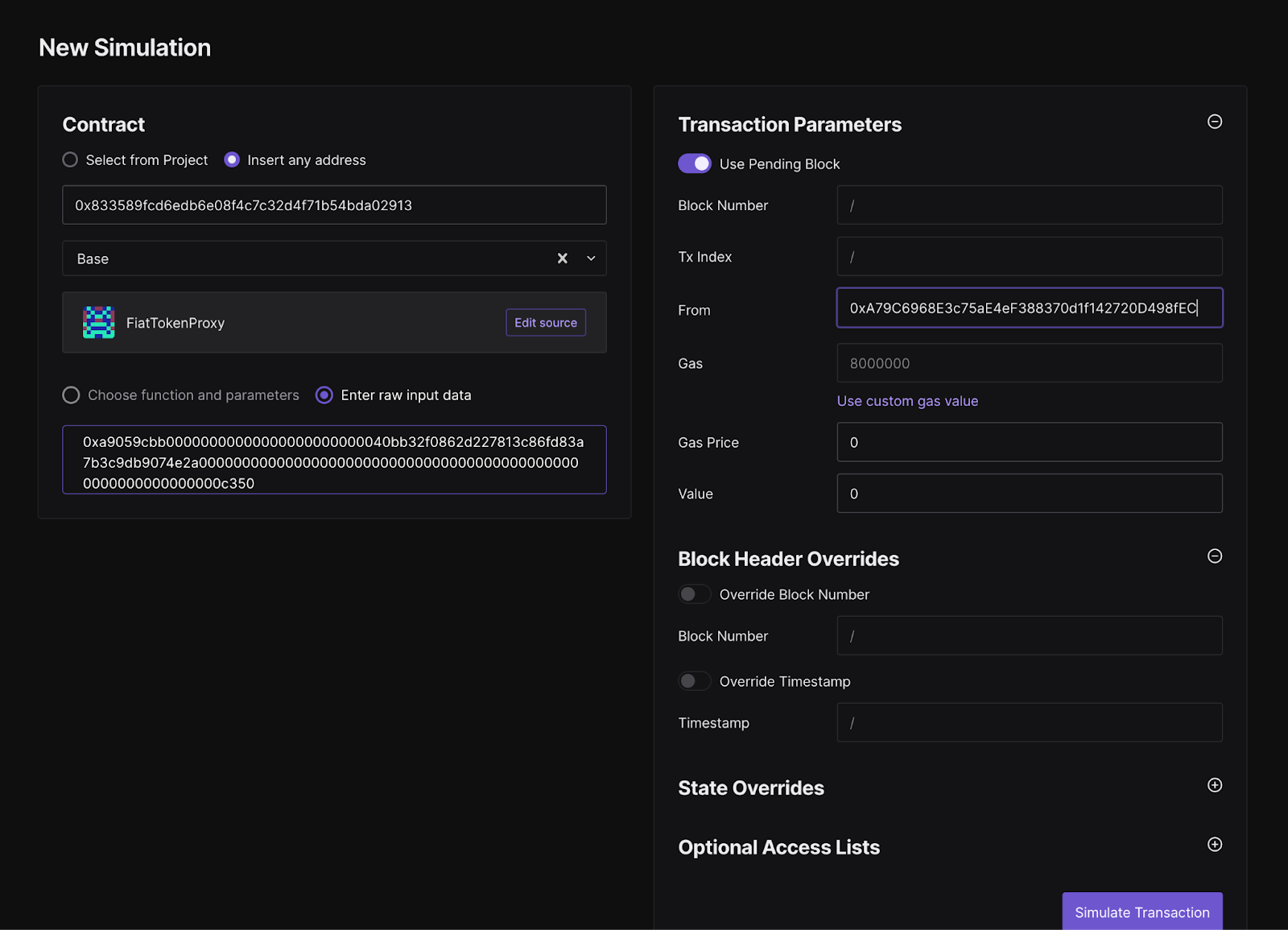
Manual simulation (when needed):
- Paste the contract address in the contract field
- Paste the calldata from the Safe UI or from the hash verification tool
- Specify the Safe address as the From address
Note: For complex batch transactions that include a delegateCall to multisend, manual simulations may not be feasible.
3) Hash & Calldata Verification
Using CLI tool:./safe_hashes.sh --network [NETWORK] --address [SAFE_ADDRESS] --nonce [NONCE]The CLI tool pulls the queued transaction from the Safe API for verification. If Safe infrastructure is compromised, it's possible the tool will show a hash that matches the UI, but the transaction is still not what you intend to sign. However, if you also verify the calldata output by the tool, you can be sure you are signing the correct data.
Interactive mode (no Safe API dependency): Use --interactive to enter all transaction details manually. Note that
in interactive mode the tool does not decode the calldata, so it's important to perform the calldata verification in
step 5.
Using web UI (OpenZeppelin Safe Utils)
- Navigate to OpenZeppelin Safe Utils
- Enter Safe address (checksummed)
- Select network and enter nonce
- Review generated hashes and decoded calldata
Important: Both tools require checksummed addresses:
Checksummed address examples
-
✅ Correct:
0xA79C6968E3c75aE4eF388370d1f142720D498fEC -
❌ Incorrect:
0xa79c6968e3c75ae4ef388370d1f142720d498fec -
Interactive mode note: In interactive mode the CLI does not decode calldata; be sure to perform the calldata verification in step 5.
4) Hash Comparison
- Message Hash on tools must match hardware wallet display
- Domain Hash ensures correct Safe
- SafeTxHash for nested Safe approvals
5) Calldata Review
Hash verification confirms you are signing the right transaction (the one that was proposed), but the hash alone does not tell you what the transaction actually does. You need to decode the calldata to understand the on-chain action. Never sign a transaction you do not understand.
How Calldata Works
EVM calldata consists of:
- Function selector (first 4 bytes): Identifies which function is being called. For example,
0xa9059cbbis the selector fortransfer(address,uint256). - ABI-encoded parameters (remaining bytes): The function arguments encoded according to the Solidity ABI specification.
For batch transactions using MultiSend, the calldata contains multiple packed transactions. Each must be individually decoded and reviewed.
Decoding Steps
- Copy the calldata from the Safe UI or from the hash verification tool
- Paste into a decoder (e.g., SwissKnife Calldata Decoder, Foundry
cast decode-calldata) - Verify the function name, target address, and parameters match the expected values
- For protocol-specific functions, consider building internal decoding tooling tailored to your contracts for human-readable output
Common Red Flags
DELEGATECALL(operation type 1): Gives the target contract full control over the Safe's storage. Should only appear when the target is a known, audited module.- Unexpected
approveorsetApprovalForAllcalls: Could grant unlimited token spending to an attacker's address. MultiSendwhen a single action was expected: Extra calls could be hidden in a batch.- Unfamiliar function selectors: If you cannot identify the function being called, do not sign until you verify it.
- Parameters that do not match the briefing: Wrong recipient, wrong amount, wrong contract address.
- Mismatched target contract: The function call is going to a different contract than described.
Tool Diversity Recommendation
Signers should not all use identical tools. Cross-verify results between multiple tools (CLI and web) for critical operations.
Special Cases: Nested Safes
- Use
--nested-safe-addressand--nested-safe-nonceto verify approveHash flows